

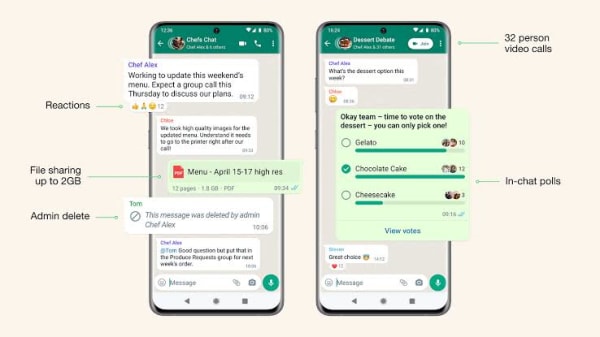
WhatsApp has become one of the leading platforms for group chats. The reason is because it's easy to use and navigate, is compatible with various devices, including web browsers, and delivers a consistent experience on both Android and iOS. Available worldwide and launched in 2009, WhatsApp has continually evolved, adding numerous features over the years.
If you use WhatsApp, you’re likely part of at least one group chat—whether for school friends, your child’s sports team, family, or social events. The app offers many tools for group chat management, which you might not be fully aware of yet.
These tools cater to both administrators and regular participants, enhancing the overall group chat experience. Understanding these features can help you make better use of WhatsApp and manage your group messages more effectively.
Group Chat Features for Admins
Admins can access key group settings by tapping the group name at the top of the chat and selecting Group permissions. This option is available to the group creator or anyone granted admin status by another admin.
Edit Group Settings: Decide if non-admin members can change group details, such as the name, description, photo, pinned messages, or disappearing messages. This applies to all members uniformly.
Send Messages: Restrict posting privileges to admins only. This is particularly useful for large groups to keep discussions organized and on-topic.
Add Members: Prevent non-admins from inviting new participants. Combined with the Approve New Members option, admins can require their approval before anyone joins through links, QR codes, or other methods.
Edit or Assign Admin Roles: Admins can promote or demote other members using this option. However, the group creator retains admin privileges permanently.
Features for Group Participants
Non-admin members also have access to tools that enhance group chat functionality, depending on the permissions set by admins.
Disappearing Messages: Members with permissions can enable messages to auto-delete after 24 hours, 7 days, or 90 days, helping to reduce chat clutter. Note that the timer starts when the message is sent, so unopened messages will disappear after the set period.
Chat Lock: Hide specific chats and secure them using your phone’s authentication methods, such as face or fingerprint recognition.
Participants can also simplify group interactions with additional tools:
Share Location: Use the location-sharing feature to inform others of your whereabouts in real-time or at a specific moment, streamlining meetups.
Create Polls: Polls make decision-making more efficient, whether choosing a date or destination for an event. This avoids lengthy, chaotic conversations and helps gather opinions quickly.
By mastering these features, both admins and participants can make group chats on WhatsApp more organized and enjoyable.